

Seat Types
A user’s Seat Type determines whether they can record meetings and consume credits from your organization’s shared pool. Credits are managed at the company level — there is no individual credit limit.A Viewer Seat cannot record or upload calls regardless of User Role. This seat type is typically assigned to managers and admins who need oversight without contributing their own call recordings.
Add-ons
Add-ons provide extra functionality tied to a user’s seat type.- AI Coach Bot: available exclusively for users with a Recording Seat. To enable this add-on for a user, contact the support team at support@triplesession.com.
How to assign seat types
1
Navigate to the People page
Go to Settings > Team > People.
2
Find the Seat Type column
Locate the Seat Type column in the People table.
3
Open the dropdown
Click the dropdown next to the user you want to update.
4
Assign a seat
Select Recording Seat for users who need to record, upload, or import meetings, or Viewer Seat for users who only need to review calls and analytics.
User Roles
A user’s permissions come from their role. Member and Manager are workspace roles — every user is one or the other. Admin is a separate company-level role that can be granted to any user, whether they’re a Member or a Manager, adding company-wide settings on top of their workspace role. (Seat Type, not role, determines whether they can record.)Member
The standard permission level for most users.Manager
This role is for team leads or managers who need oversight of their workspace. Managers inherit all Member capabilities, plus the following:Admin
A company-level role layered on top of a user’s Member or Manager role. It adds permissions for company-wide settings and integrations — it does not change their workspace access.Admin only covers company-wide configuration. A user’s workspace access — viewing calls, managing the team — still comes from their Member or Manager role. For example, a Member who is also an Admin can manage integrations but still only sees their own calls.
The role tables above are the baseline. Several specific actions are configurable — admins can decide which roles can perform them. See Company Permissions below.
Company Permissions
Beyond the fixed role capabilities above, Admins can control who can perform specific actions across the company from Settings > Organization > Permissions. Each action can be granted to Admins, Managers, or Members independently, grouped into four sections. Admins always have access, and defaults are kept conservative — nothing changes for a role until you opt it in.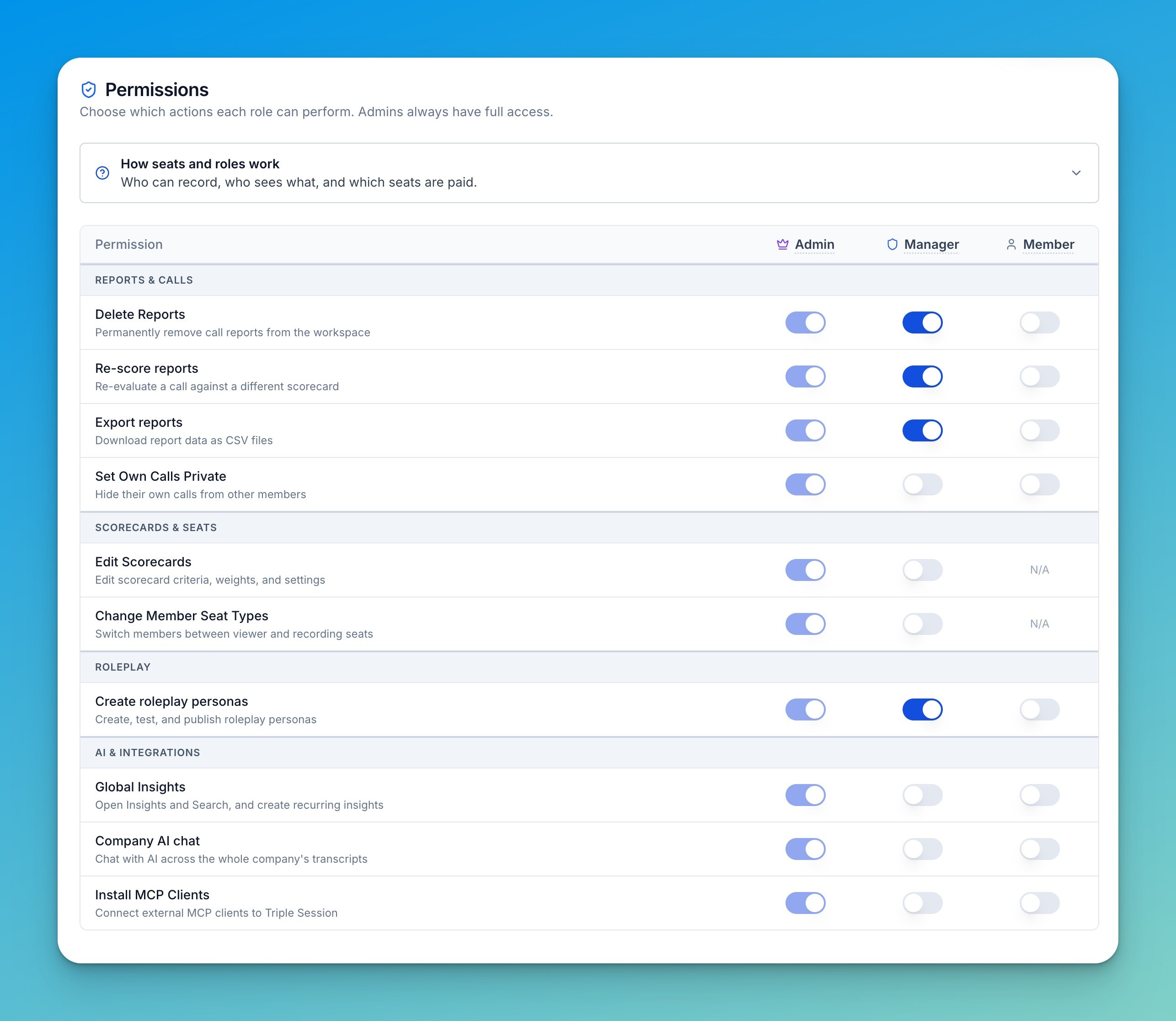
Reports & calls
Scorecards & seats
Edit scorecards and Change member seat types cannot be granted to Members — they’re shown as N/A for that role and are available to Managers and Admins only.
Deactivating members
Deactivating someone switches their seat to Viewer, so it follows the same permission:- Admins can deactivate and reactivate anyone.
- Managers with Change member seat types can deactivate and reactivate members of the workspaces they manage.
- Only admins can deactivate or reactivate a manager or an admin. Managers see the option greyed out.
- Nobody can deactivate themselves.
Roleplay
AI & integrations
Visibility
Visibility controls whether a member appears in team-level reporting. It is separate from Seat Type and User Role: a member can have full access to their own calls while staying out of shared metrics. Use Hidden for non-selling managers, sales ops, or admins who review calls but should not skew team performance data.
Set visibility when inviting a member (the Visibility column) or change it later from the Visibility column on the People table. For the step-by-step, see Manage People.
Visibility is distinct from meeting access (who can open a recording or AI report). To control access to recordings, see Privacy Settings.